Ansible
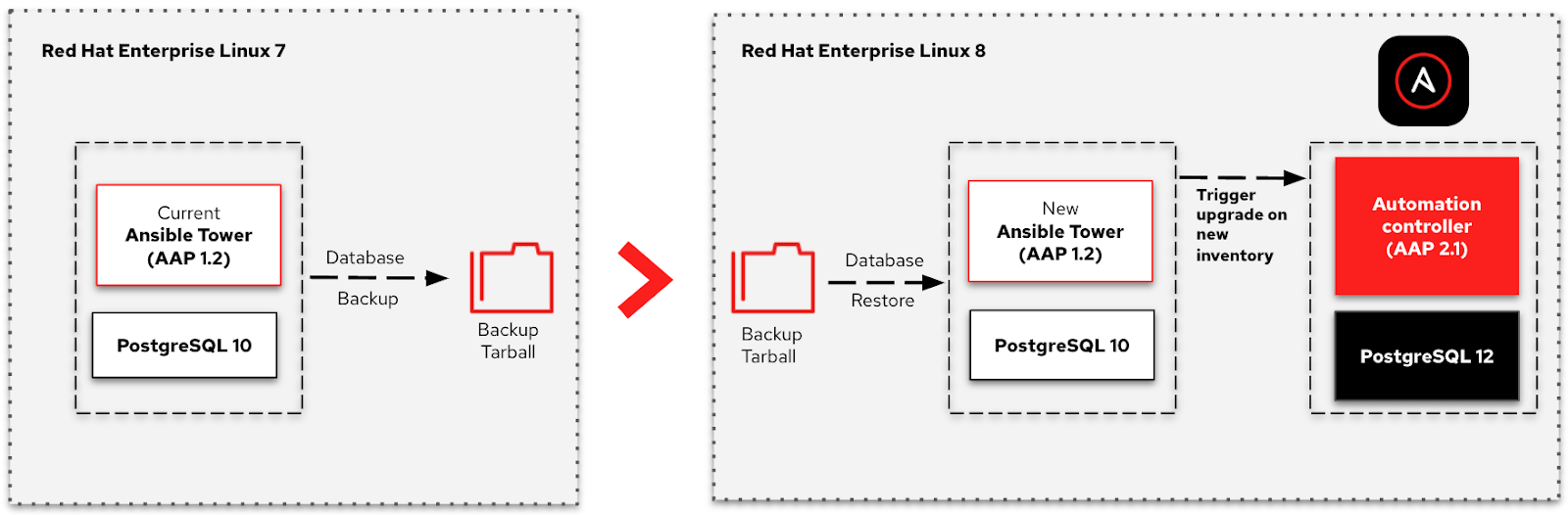
Ansible Automation Platform 1.2 to 2 Migration Guides
 Gineesh Madapparambath
The information is collected from the official documents and aggregated to focus on the migration topic.

How to pass extra variables to an Ansible playbook
Learn the ability to pass extra variables to an Ansible playbook. This feature is available when using the Ansible CLI or Ansible Tower.

How to send email using Ansible and Gmail
How to configure your Gmail credential and Ansible to send automated email using Ansible playbook.
Ansible Automation for Windows
This is a collection of articles and references about Windows automation using Ansible, published in techbeatly and other platforms.
Ansible Navigator Cheat Sheet
What is ansible-navigator ansible-navigator is the new command line utility (CLI) introduced in Ansible Automation Platform 2, for running and …
Ansible and VSCode Remote Development [LIVE]
 Editorial
Learn How to use VSCode with Remote SSH and development.
Ansible Convert List to String
I noticed many users are using different and wrong methods to convert a list data to string format. You can use existing filters and functions...
Ansible Collections [LIVE]
Ansible Collection is a great way of getting content contributions from various Ansible Developers. We will learn what is Ansible Collection and how …
How to Start with Ansible [LIVE]
Are you an absolute beginner and struggling to start your Ansible journey ? Join us this Sunday 31st Oct, 7.30 PM IST/10PM SGT
Python Virtual Environments for Ansible [LIVE]
It’s vital to test new technology before rolling it out into your production environment. I like to use Python virtual environments provided by the …
Ansible Windows Management using HTTPS and SSL
In this article you will learn how to connect Windows from Ansible using HTTPS and SSL certificate
Ansible for Windows – Troubleshooting
There are many cases where Ansible developers and users struggled to connect Windows machine from Ansible.